

Use this guide when you have lost admin access and cannot use the password reset feature. These steps use phpMyAdmin.
Open Your Database
Log in to phpMyAdmin and select your FOSSBilling database. You can find the database name in
config.php.If you need help accessing phpMyAdmin, contact your hosting provider.
Edit Your Admin Account
- Click the Structure tab to see all tables
- Open the admin table
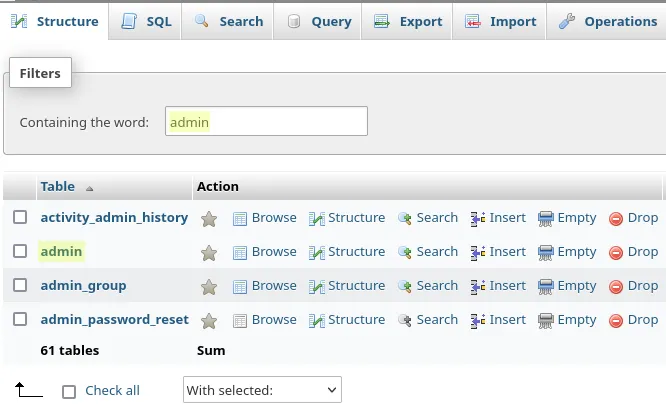
- Click the Browse tab to see all admin accounts
- Find your account and click Edit

Set a Temporary Password
The
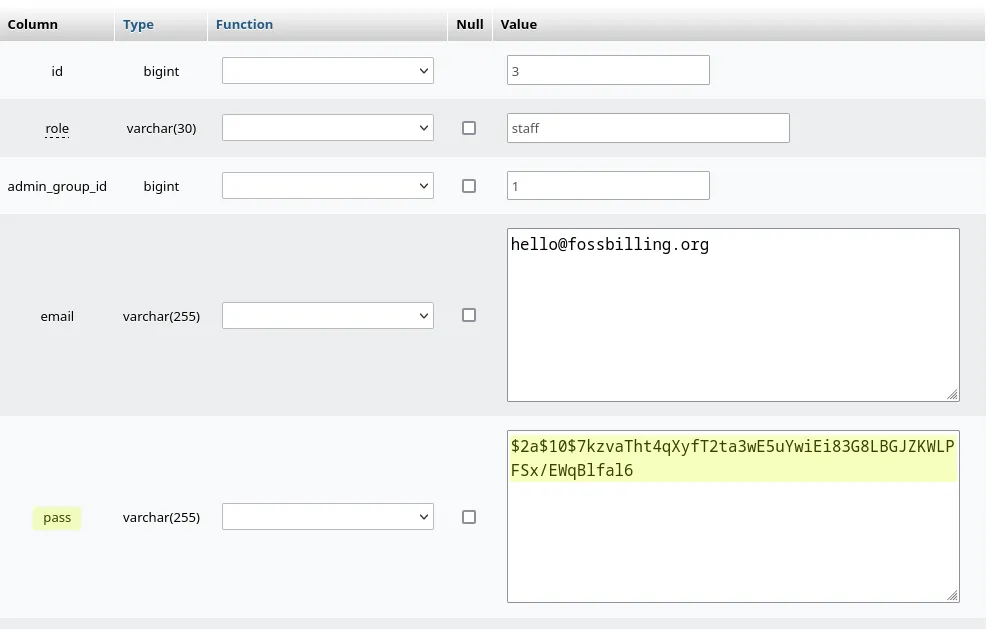
passfield needs a bcrypt hash. Generate one locally with Bash and PHP on a machine you trust. Do not use online hashing tools.Terminal window IFS= read -r -s -p 'Temporary password: ' fossbilling_temp_passwordprintf '\n'printf '%s' "$fossbilling_temp_password" |php -r 'echo password_hash(stream_get_contents(STDIN), PASSWORD_BCRYPT), PHP_EOL;'unset fossbilling_temp_passwordEnter a temporary password at the prompt. It will not appear on screen or in your shell history.
- Copy the generated hash
- Paste it into the pass field
- Click Go to save
Log In and Change Your Password
Log in with your temporary password, then change it:
- Click your name in the top right corner
- Go to Profile
- Switch to the Change Password tab
- Set a strong, unique password