

Use this guide when you have lost admin access and cannot use the password reset feature. These steps use phpMyAdmin, but any database tool will work — the steps will simply differ slightly.
Step 1: Log into phpMyAdmin
Section titled “Step 1: Log into phpMyAdmin”Log in to phpMyAdmin. Not sure how? Contact your hosting provider.
Step 2: Select Your Database
Section titled “Step 2: Select Your Database”Choose the database you installed FOSSBilling on. If you're not sure which one, check your config.php file.
Step 3: Find the Admin Table
Section titled “Step 3: Find the Admin Table”- Click the Structure tab to see all tables
- Find and click on the admin table
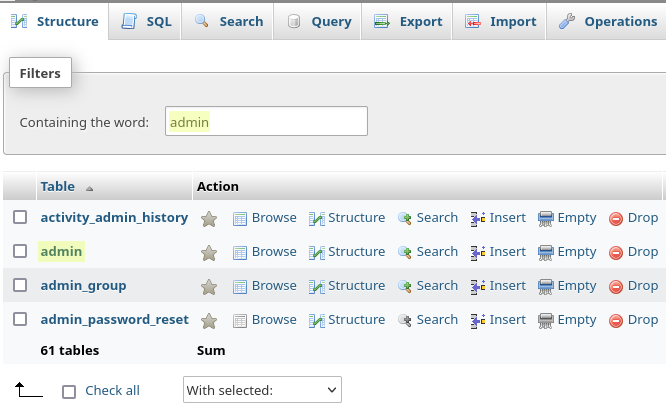
- Click the Browse tab to see all admin accounts
- Find your account and click Edit

Step 4: Generate New Password Hash
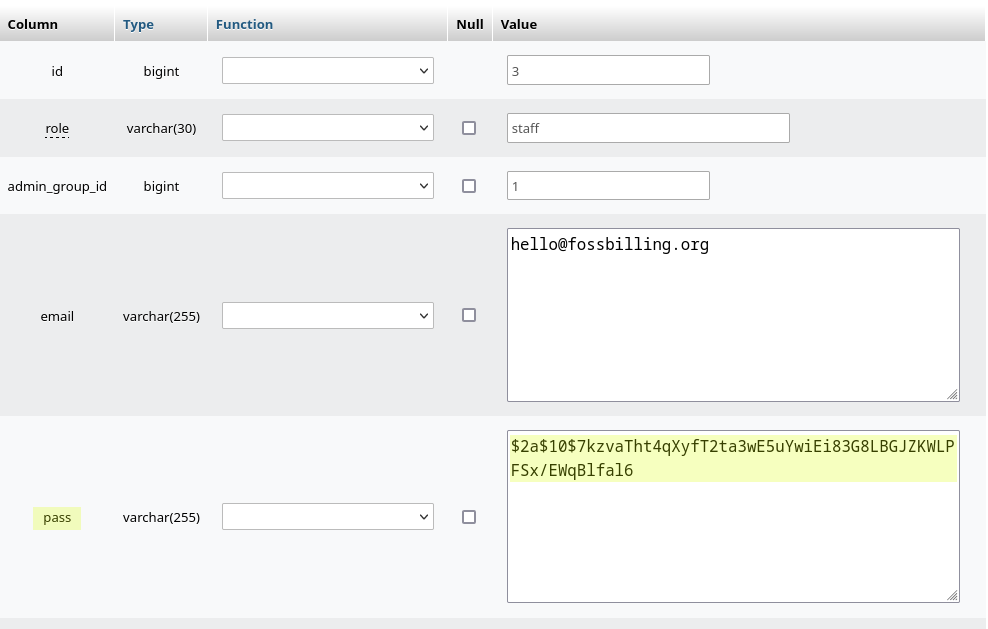
Section titled “Step 4: Generate New Password Hash”The pass field needs a bcrypt hash. Generate one locally:
php -r 'echo password_hash("temporary-password-here", PASSWORD_BCRYPT), PHP_EOL;'- Replace
temporary-password-herewith a temporary password - Copy the generated hash
- Paste the hash into the pass field
- Click Go to save
Step 5: Log In and Change Your Password
Section titled “Step 5: Log In and Change Your Password”You can now log in with your temporary password. Important: Change it immediately to a secure password:
- Click your name in the top right corner
- Go to Profile
- Switch to the Change Password tab
- Set a strong, unique password
Password reset complete. Store your password securely — ideally in a password manager.