

FOSSBilling generates invoice PDFs with Dompdf, which renders HTML and CSS into a printable document.
CSS Limitations
Section titled “CSS Limitations”Dompdf doesn't support everything. As of version 2.0.3:
| Supported | Not Supported |
|---|---|
| CSS 2.1 and some CSS3 | Flexbox |
@import, @media, @page | CSS Grid |
| Basic positioning | Complex layouts |
Custom CSS
Section titled “Custom CSS”Creating a Custom Stylesheet
Section titled “Creating a Custom Stylesheet”- Copy
/modules/Invoice/pdf_template/default-pdf.css - Paste as
/modules/Invoice/pdf_template/custom-pdf.css
FOSSBilling automatically uses custom-pdf.css if it exists.
CSS Classes Reference
Section titled “CSS Classes Reference”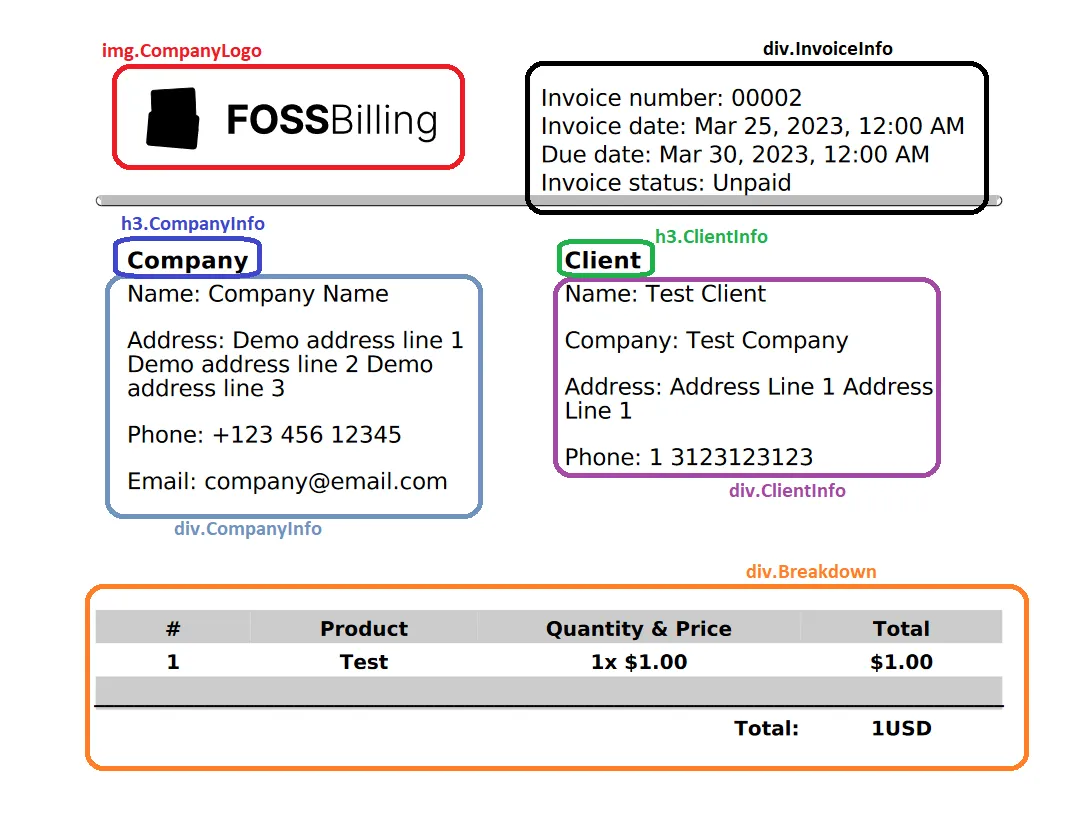
Common classes include:
.invoice-header— Company and client info.invoice-details— Invoice number, date, due date.invoice-items— Line items table.invoice-totals— Subtotal, tax, total.invoice-footer— Terms, notes
Custom HTML Template
Section titled “Custom HTML Template”FOSSBilling 0.6.0+: Customize the HTML structure.
Creating a Custom Template
Section titled “Creating a Custom Template”- Copy
/modules/Invoice/pdf_template/default-pdf.twig - Paste as
/modules/Invoice/pdf_template/custom-pdf.twig
FOSSBilling uses custom-pdf.twig automatically.
Template Variables
Section titled “Template Variables”Available in PDF templates:
| Variable | Description |
|---|---|
invoice | Invoice data (id, total, items, etc.) |
client | Client information |
company | Your company details |
currency | Currency code and symbol |
Example: Add a Custom Header
Section titled “Example: Add a Custom Header”<div class="custom-header"> <img src="{{ company.logo_url }}" alt="{{ company.name }}"> <h1>INVOICE #{{ invoice.serie_nr }}</h1></div>Twig Filters
Section titled “Twig Filters”PDF templates support the same Twig filters available elsewhere in FOSSBilling:
{{ invoice.total | money }} {# Format as currency #}{{ invoice.created_at | timeago }} {# Show relative time #}Testing Changes
Section titled “Testing Changes”- Make your edits to
custom-pdf.cssorcustom-pdf.twig - Generate a test invoice
- Download the PDF
- Review the output
Debugging
Section titled “Debugging”For complex issues, enable Dompdf debugging in config.php:
'dompdf' => [ 'debug' => true,],Then review your PHP error logs for Dompdf-related messages.